AI Chatbots
How to Measure RAG Accuracy Before You Launch
RAG accuracy is two scores, not one. See how to build a gold question set, measure both halves, and set release gates that hold.
How to build an AI chatbot for Slack and Microsoft Teams that answers from your own documents, respects permissions, cites its sources and hands off to a person when it should.
 By Yatin Chaudhary
11 min read
By Yatin Chaudhary
11 min read
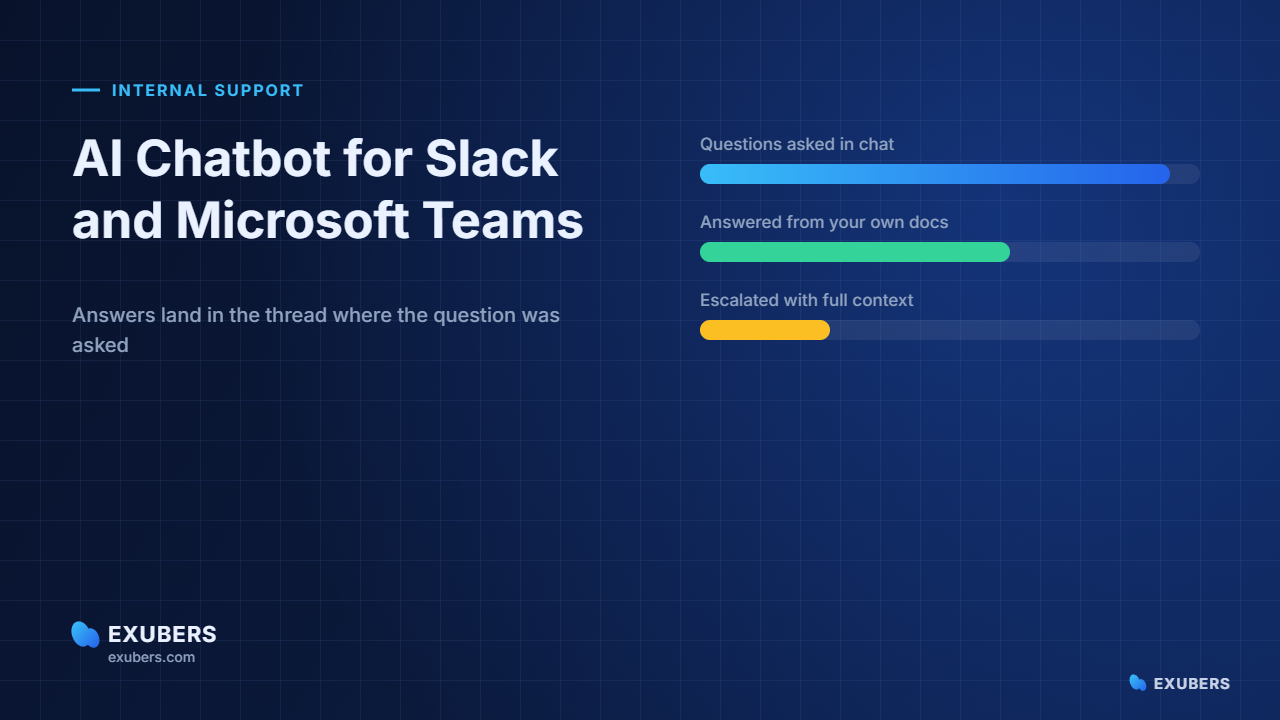
Most internal questions never reach a help desk. They land in a Slack channel, and a colleague answers them from memory. An AI chatbot for Slack changes that habit, because the same question gets a sourced answer in seconds and nobody has to stop what they are doing.
Microsoft Teams behaves in much the same way. However, the two platforms differ in how they handle identity, threads and app approval. So this guide covers both, and it flags the points where the build genuinely diverges.
The advice below comes from rollouts we run with support, IT and HR teams. Above all, it reflects one lesson. The model you choose matters far less than the plumbing around it.
Every knowledge tool competes with the path of least resistance. For most employees, that path is a message to a teammate. It is fast, it is social, and it always returns something.
A wiki asks people to leave the conversation, open a new tab, search, and judge whether the top result is current. In contrast, an AI chatbot for Slack answers inside the thread and shows the page it used. The cost of asking drops to almost nothing.
As a result, adoption stops being a training problem. You are not teaching a new habit. You are improving one that already exists, which is why chat rollouts usually beat portal rollouts on usage within the first fortnight.
There is a second benefit, and it is quieter. Because the questions arrive as text in public channels, you finally get a clean record of what people actually need. That record becomes the roadmap for your documentation.
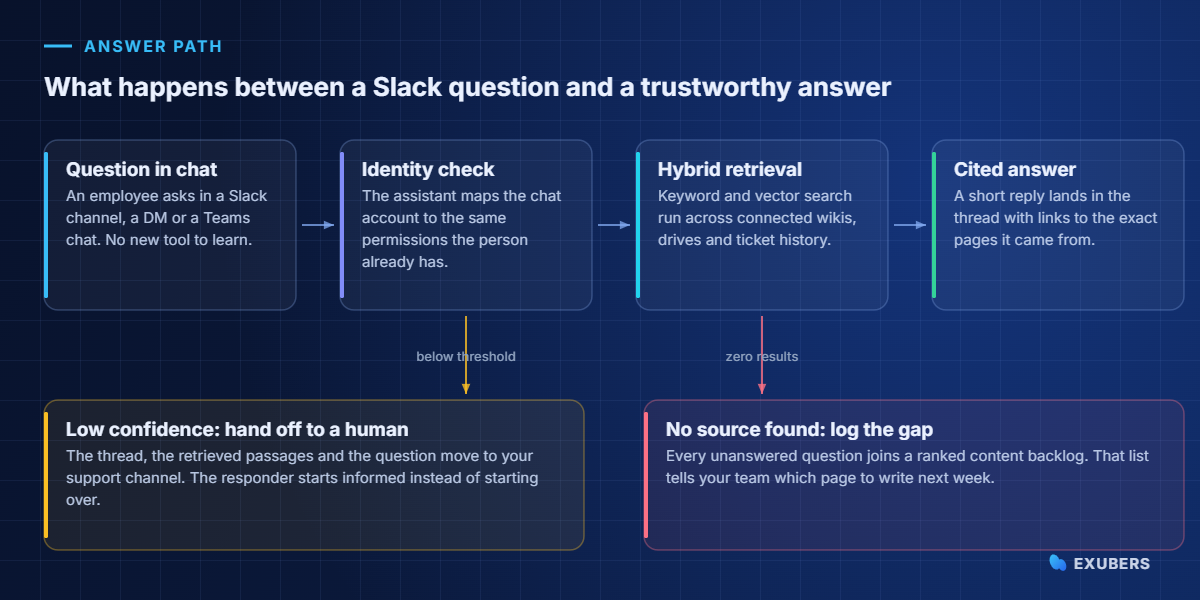
A good assistant does five things in order. Skip any one of them and the answers become confident guesses, which is the failure mode that kills trust in week two.
Notice that generation sits fourth on that list. Teams often start with the model and finish with retrieval. In practice, the opposite order produces better answers on a smaller budget.
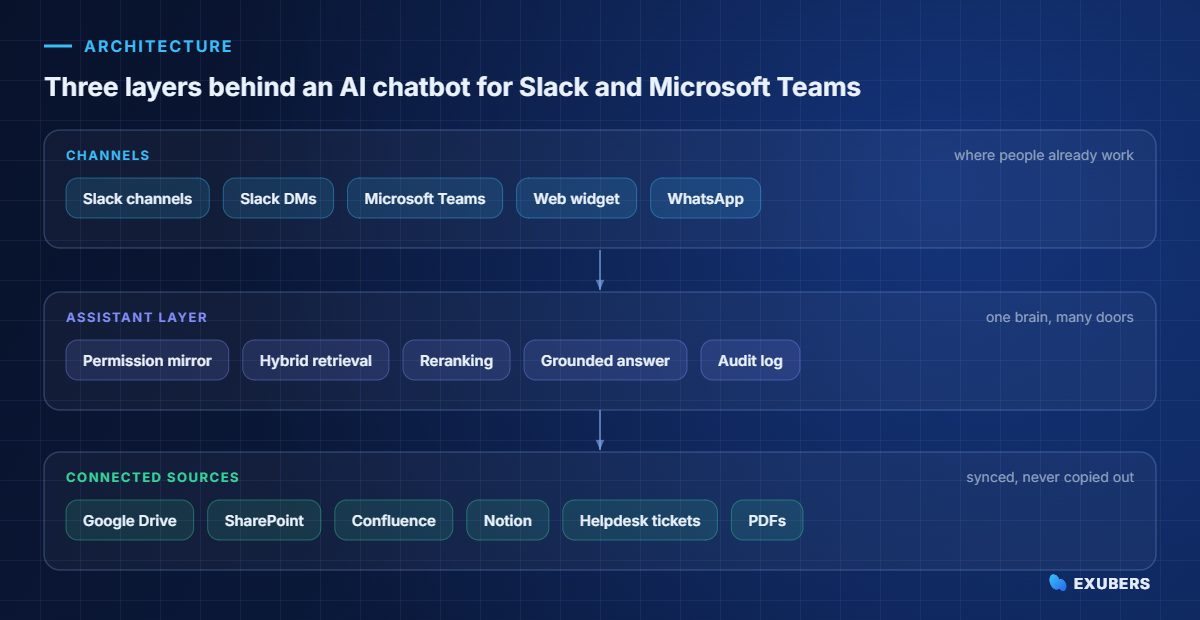
Keep the design boring and it will survive contact with your IT team. The top layer holds the channels people use. The middle layer holds retrieval, permissions and logging. The bottom layer holds the systems where your content already lives.
This separation matters more than it looks. When WhatsApp or a web widget gets added next quarter, only the top layer changes. Meanwhile the retrieval logic, the permission rules and the audit trail stay exactly as they are.
It also keeps your content in place. A well-built assistant reads from your existing document stores rather than demanding a migration, so nobody has to move a decade of files before the pilot starts.
At first glance, the user experience looks similar. Underneath, though, several details differ enough to change your project plan.
| What differs | Slack | Microsoft Teams |
|---|---|---|
| Identity | Slack user ID, usually mapped to email | Entra ID, which often maps straight to file permissions |
| Approval | Workspace admin installs the app | Tenant admin approves, and policy review can add weeks |
| Threading | Threads are native and heavily used | Replies sit under a post, so context is easier to lose |
| Where people ask | Public channels first, DMs second | Chats first, channels second |
| Content nearby | Links to Drive, Notion and Confluence | Files usually sit in SharePoint and OneDrive |
| Fastest win | A channel bot in your busiest support channel | A personal chat assistant, then channel access |
One practical consequence stands out. In Teams, the tenant approval step is the schedule risk, so start it in week one. In Slack, the risk is noise, because a chatty bot in a busy channel gets muted quickly.
Security review is usually where most pilots stall. The question is always the same. If the assistant can read the salary folder, can a curious employee reach it by asking politely?
The safe answer is that retrieval itself has to respect permissions. Filtering results after the model has already seen them is not a control, because the sensitive text has been read. Instead, the permission check belongs inside the search, before any passage reaches the model.
In practice that means three things. First, the assistant mirrors the access rules from the source system. Second, it re-checks those rules at query time rather than trusting a nightly copy. Third, it logs every question, every source used and every person who asked.
Indian teams have an extra reason to care. Under the DPDP Act, employee records count as personal data, and a chat assistant that quietly widens access creates real exposure. Our guide to permission-aware chatbots and DPDP covers the detail.
Connect narrowly at first, then expand. A small, current corpus beats a large, stale one every time.
| Source | Why it earns a place | Effort |
|---|---|---|
| Help centre or policy wiki | Already written as answers, so it needs little cleanup | Low |
| Resolved tickets | Contains the real phrasing employees use | Low |
| Google Drive or SharePoint | Holds the documents people actually cite | Medium |
| Confluence or Notion | Strong for process and engineering questions | Medium |
| Old shared drives | Mostly outdated, and it drags answer quality down | Skip at first |
Duplicate and outdated content causes more bad answers than any model limitation. Therefore, before you connect a source, ask one question. Would you send a new joiner to this folder unsupervised?
Naturally, usage charts flatter everyone. Ask for outcome numbers instead, and agree on them before the pilot begins.
| Metric | What it means | Healthy range |
|---|---|---|
| Grounded answer rate | Replies that cite at least one real source | Above 90 per cent |
| True resolution | Answers with no repeat question within 48 hours | 35 to 60 per cent of questions |
| Escalation quality | Handoffs that arrive with the thread and sources attached | 100 per cent |
| Median time to answer | Question sent to reply posted | Under 10 seconds |
| Content gaps closed | Logged gaps turned into published pages each month | Rising every month |
The last row deserves attention. An assistant that surfaces gaps and prompts new documentation keeps improving on its own, whereas one that hides gaps quietly plateaus.
Long pilots lose their sponsors. Four weeks is enough to prove value, provided the scope stays tight.
| Week | Focus | Done when |
|---|---|---|
| Week 1 | Pick one audience, start platform approval, list the top 30 questions | Approval is in flight and the question list is signed off |
| Week 2 | Connect two sources, mirror permissions, answer the 30 questions offline | At least 25 answers are correct and cited |
| Week 3 | Launch in one channel, with escalation and logging switched on | Real questions flow, and handoffs carry context |
| Week 4 | Review gaps, publish missing pages, tune confidence thresholds | You can report true resolution honestly |
Resist the urge to launch everywhere at once. A single well-served channel creates advocates, and those advocates make the second rollout far easier.
In our experience, five patterns account for nearly every disappointing pilot.
None of these are model problems. Each one is an operating decision, which is good news, because operating decisions are cheap to change.
An assistant in chat is a front door. Behind it sits the same retrieval stack that powers an enterprise knowledge chatbot anywhere else in your business.
Because of that, the work is reusable. Once permissions, connectors and evaluation exist, adding a web widget or a customer-facing assistant becomes a configuration task rather than a new project.
Platforms such as Intellowork package that stack directly. You connect your sources, mirror the permissions you already have, and let employees ask in Slack or Teams while every answer keeps its citations.
Format decides whether people trust the reply, and it decides it quickly. A wall of text reads like a guess, while a short answer with a link reads like a colleague who checked.
In practice, three elements do the work. Lead with the direct answer in one or two sentences. Follow with the specific condition or exception that applies. Close with the source, named and linked, so the reader can confirm it in a click.
Furthermore, length matters more than teams expect. Under sixty words, people read the whole reply. Beyond that, they skim, and skimming is where misunderstandings begin.
Tone should stay plain. An AI chatbot for Slack that writes like a policy document gets ignored, whereas one that writes like a helpful teammate gets quoted back to other people in the channel.
Budget conversations usually focus on model pricing at first. In reality, inference is rarely the largest line item for internal use.
| Cost area | Share of effort | What drives it |
|---|---|---|
| Connectors and sync | High | Number of systems, and how messy their permissions are |
| Content cleanup | Medium | Duplicate pages, outdated policies, missing owners |
| Evaluation and tuning | Medium | Building a question set and reviewing answers weekly |
| Model usage | Low | Question volume and answer length |
| Platform approval | Variable | Security review, mostly in Microsoft Teams tenants |
Because of that split, the cheapest way to improve an AI chatbot for Slack is usually editorial. Fix the five pages that generate the most questions, and answer quality moves further than any model upgrade would.
Plan for ongoing effort too. An hour a week reviewing flagged answers keeps accuracy steady, and it costs far less than a rebuild six months later.
Accuracy decays quietly after launch. A policy changes, the old page stays live, and the assistant keeps quoting it with perfect confidence.
Fortunately, three habits prevent that drift. Give every connected page an owner and a review date. Re-index on a schedule that matches how fast the source changes. Finally, review the weekly list of low-confidence answers, because it points straight at the pages that need attention.
Version conflicts deserve a rule of their own. When two documents disagree, the assistant should surface both and name the newer one rather than silently picking a winner. People forgive uncertainty, yet they rarely forgive a wrong answer delivered smoothly.
Above all, ownership is the part teams underestimate. Someone has to read the gap report each month and decide what gets written. Without that person, the backlog grows and the assistant slowly stops improving.
Four weeks is realistic for one audience and two content sources. Microsoft Teams can take longer, because tenant approval sits outside your control. Start that request on day one.
Not if retrieval respects permissions. The assistant should search as the person asking, so a passage the employee cannot open never reaches the model in the first place.
No. Start with the ten pages that answer your most common questions, then let the gap report tell you what to write next. Rewriting everything upfront delays the value and rarely improves accuracy.
It should say so and pass the thread to a person, with the question and the retrieved passages attached. A confident wrong answer costs far more than an honest handoff.
Yes. The channels are separate front doors into the same retrieval layer, so answers, permissions and logs stay consistent across both.
To begin with, Slack search finds messages. An AI chatbot for Slack reads your documents, policies and tickets, then writes an answer with sources. It also covers content that never appeared in a message.
To begin with, pick the noisiest channel in your company. Write down the questions asked there this week, connect the two systems that hold those answers, and switch on an AI chatbot for Slack with citations and escalation from the first day.
Then measure true resolution, not conversation counts. If the queue gets quieter and the answers keep their sources, you have something worth widening. If you want that stack ready-made, Intellowork connects your documents, mirrors your permissions and answers in chat, so your team can test the idea in weeks rather than quarters.

Yatin Chaudhary writes on enterprise search, AI retrieval and platform engineering at Exubers Technologies, where the team builds search, AI, cloud and DevOps systems for enterprises across India and the GCC.
RAG accuracy is two scores, not one. See how to build a gold question set, measure both halves, and set release gates that hold.
A multilingual AI chatbot answers a Hindi question from English documents. Here is the architecture, the testing method and a…
A voice AI agent answers support calls from your own documents. See the stack, the latency budget and a safe rollout plan.
Tell us what you are trying to ship. We will tell you what it actually takes — scope, sequence and the risks worth knowing about before you commit budget.