AI Chatbots
How to Measure RAG Accuracy Before You Launch
RAG accuracy is two scores, not one. See how to build a gold question set, measure both halves, and set release gates that hold.
Per-message pricing changed the economics of WhatsApp automation. Here is how the channel works, what it really costs, and which conversations are worth automating first.
 By Yatin Chaudhary
10 min read
Updated 4 Sep 2026
By Yatin Chaudhary
10 min read
Updated 4 Sep 2026
In India, most customers would rather message a business than call it or email it. That single behaviour is why a WhatsApp AI chatbot has become the default support and sales channel for so many Indian companies. It is also why so many deployments disappoint: teams buy a broadcast tool, call it an assistant, and wonder why nobody replies.
This guide covers how the channel actually works, what it costs under the current pricing model, and which use cases pay for themselves. It assumes you want an assistant that answers questions from your own content, not a menu tree with three options.
Three things make the channel unusual. First, the app is already open. Nobody installs anything, creates an account or remembers a password. Second, the thread persists, so a conversation from last month is still there with its context. Third, delivery and read rates are far higher than email, because people treat messages as personal.
For an assistant, that combination is ideal. Customers ask short, informal questions. They send photographs of a damaged item or a screenshot of an error. They expect a reply in seconds, and they forgive a “let me get a person” far more readily than they forgive a wrong answer.
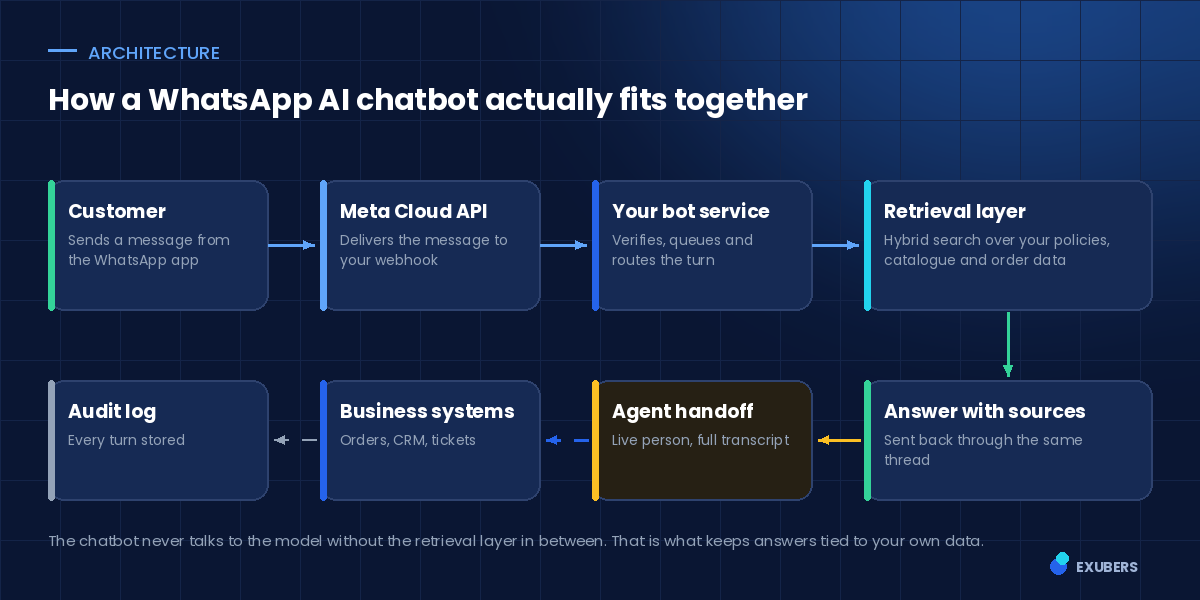
Under the surface a WhatsApp AI chatbot has four moving parts. Understanding them makes vendor conversations much easier.
Every business assistant runs on the WhatsApp Business Platform. Meta hosts the Cloud API, receives the customer’s message, and posts it to a webhook you control. You will need a verified business, a phone number dedicated to the platform, and a display name that Meta approves.
This is the piece you or your vendor operate. It verifies the webhook signature, queues the turn, keeps conversation state, and decides what happens next. It also enforces rate limits and retries, which matter more than people expect during a campaign.
Here is where a WhatsApp AI chatbot separates from a scripted bot. Before generating anything, the service searches your own content: policies, product data, help articles, order records. Hybrid search works best, because it combines exact keyword matching with meaning-based recall. Customers type product codes and vague complaints in equal measure.
The answer is then written from those retrieved passages, with the source named. Our enterprise search engineering practice treats this layer as the product, because answer quality is decided here rather than in the model.
Finally, the assistant needs a clean exit. When confidence is low, or the customer asks for a person, the conversation should move to an agent with the transcript and the retrieved sources attached. Without that, every escalation starts from zero and the customer repeats themselves.
Pricing confuses most buyers, largely because the model changed. Meta moved from conversation-based pricing to per-message pricing on 1 July 2025. Older blog posts and vendor decks still describe the previous system, so check the date on anything you read.
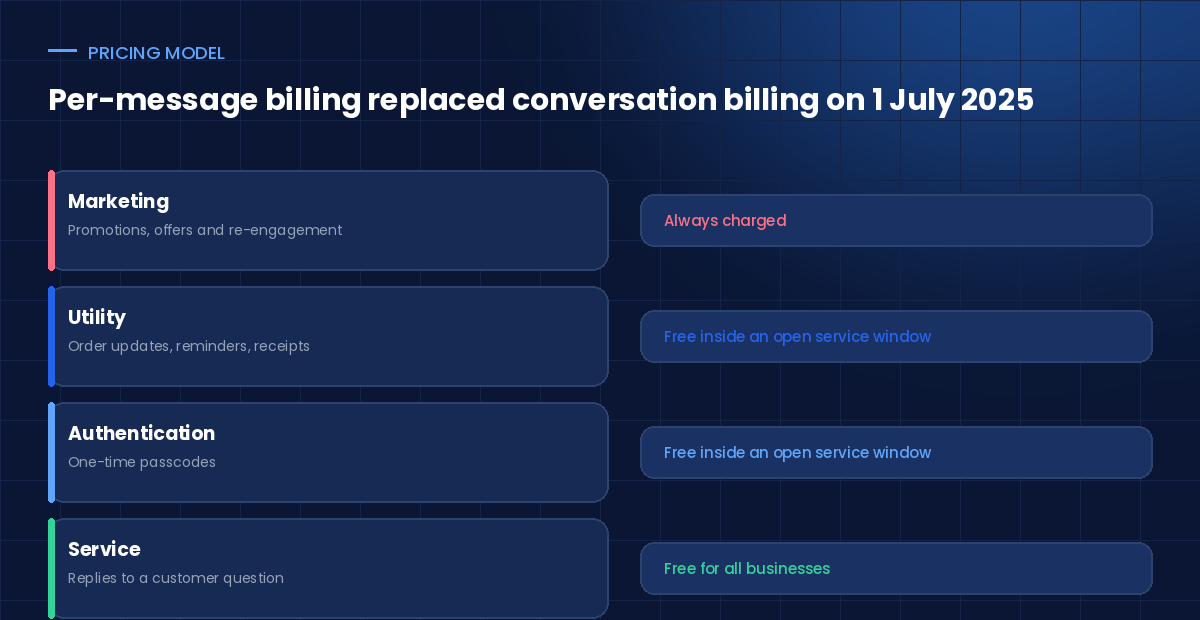
When a customer messages you, a 24-hour customer service window opens. Inside it, your non-template replies cost nothing. This is the single most important fact for anyone budgeting a WhatsApp AI chatbot, because support conversations live almost entirely inside that window.
There is a second window too. If a customer reaches you through a click-to-WhatsApp advertisement or a page call-to-action, a 72-hour free entry point window opens instead, during which all message types are free.
So your real costs are three lines, not one. You pay Meta for the messages you initiate. You pay a platform fee for the assistant. Then you pay for integration work to connect order, ticket and CRM systems.
The third line surprises people most often. Answering “where is my order” requires a live lookup, not a policy page. Budget for it as an integration project, because that is what it is.
The pricing structure rewards a specific behaviour: start conversations deliberately, then hold them well. An assistant is what lets you hold them at scale.
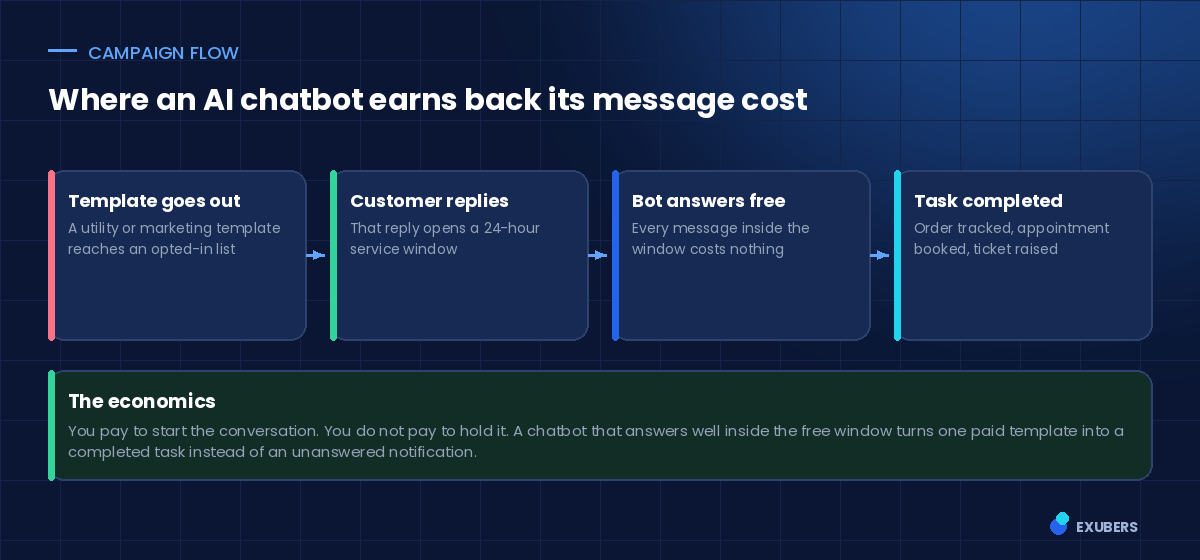
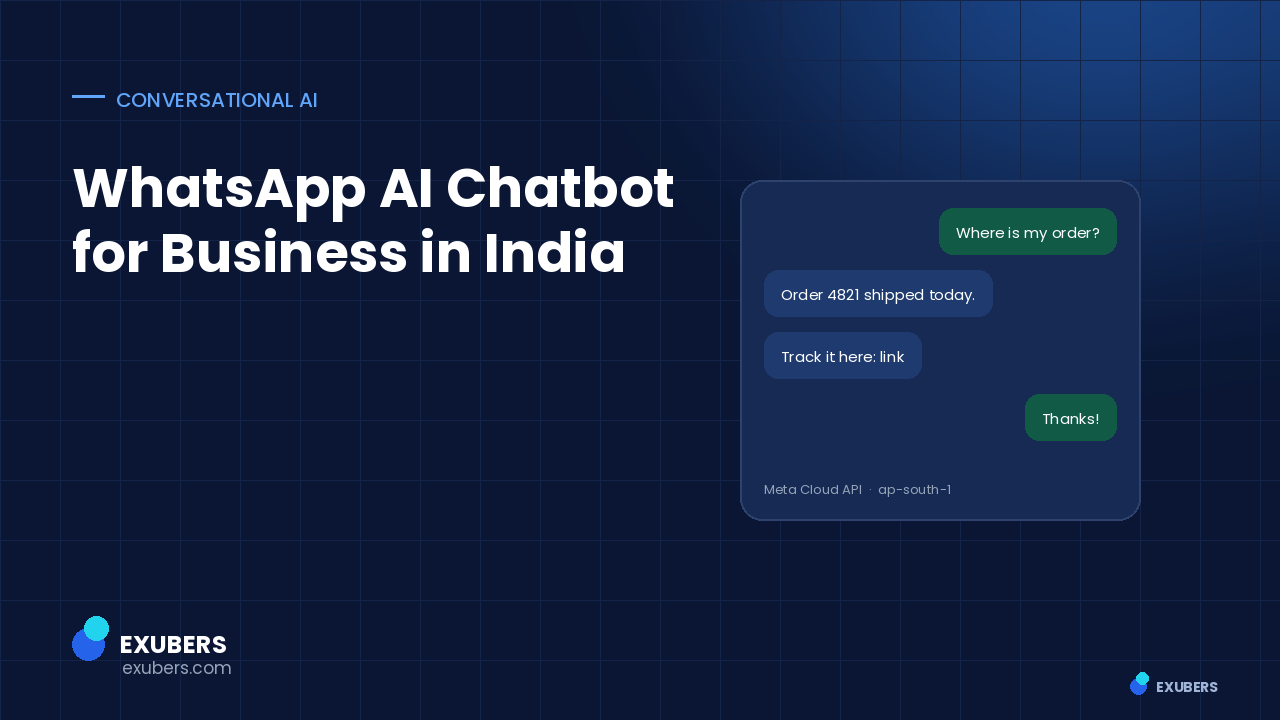
Consider a delivery notification. Sent alone, it is a cost. Sent by a business with a capable assistant, it becomes an opening: the customer replies with a question, the service window opens, and the assistant resolves the query, updates the address or books a redelivery at no additional message cost.
That is the difference between broadcasting and conversation. A broadcast tool sends and stops. A WhatsApp AI chatbot turns the reply into a completed task.
Not every conversation deserves automation. These five, however, consistently repay the setup cost for an Indian business running a WhatsApp AI chatbot.
High volume, stable answers, and a clear system of record. This is almost always the first use case worth automating, provided the assistant can query your order system directly.
Returns, warranty, sizing, ingredients, compatibility. These answers live in documents you already have, so a grounded assistant handles them well on day one.
Clinics, service centres and salons see strong results here, because booking on WhatsApp removes an entire step for the customer. It does require a multi-step workflow rather than a single answer.
For education, real estate and financial services, an assistant can qualify an enquiry, answer the obvious questions and route a warm lead to a person. The advantage is speed at hours when nobody is at a desk.
Less obvious, and often the highest return. Field staff, drivers and store teams already use WhatsApp. An assistant that answers policy and process questions there removes a large amount of quiet internal support work.
Platforms built for this pattern shorten the middle of that list considerably. Intellowork runs on the Meta Cloud API with multi-number routing, turns your existing documents into cited answers using hybrid retrieval, supports multi-step workflows such as lookups and bookings, and hands off to a live agent with the conversation intact. Because the same assistant also runs on a web widget, Slack and an API, the content work you do for WhatsApp is reused rather than repeated.
Both are sold as “WhatsApp automation”, and they behave very differently once real customers arrive. The table below is the comparison we walk clients through before they choose.
| Scripted bot | WhatsApp AI chatbot | |
|---|---|---|
| How it answers | Menus and keyword rules | Retrieval over your own documents |
| Unexpected question | Falls back to a menu | Searches, answers or refuses honestly |
| Keeping it current | Edit every flow by hand | Edit the source document once |
| Language handling | Fixed phrases only | Handles paraphrasing and mixed language |
| Failure mode | Dead end | Handoff with full context |
| Best suited to | Two or three fixed journeys | Open question volume |
Scripted flows still have a place. Booking a slot or collecting a document works fine as a guided sequence. The mistake is using that pattern for everything, because customers rarely arrive with a question your menu anticipated.
In practice the strongest deployments mix the two. The assistant answers open questions, and hands control to a short structured flow when a task needs specific fields. A well-built WhatsApp AI chatbot treats those flows as tools it can call, rather than as a separate product.
WhatsApp conversations contain personal data, and in India the Digital Personal Data Protection Rules were notified in November 2025. So treat the channel as a regulated system from the start rather than adding controls later.
You need recorded consent before sending templates, and you need to show where that consent came from. Keep the source, the timestamp and the wording. Meta enforces this too, and quality ratings fall quickly when people block a number.
Decide how long transcripts live, and make sure deletion actually reaches the search index and the backups, not only the primary database. A WhatsApp AI chatbot that indexes conversation history for context needs an erasure path through that index as well.
Ask your vendor which region stores documents, transcripts and embeddings, and where model inference happens. Indian entities usually want everything in an Indian region, with inference either regional or self-hosted. This is a straightforward question, and a vendor who cannot answer it clearly is telling you something.
If the assistant can reach internal content, it must respect who is asking. An internal helpdesk WhatsApp AI chatbot should never surface an HR document to a customer-facing agent simply because the retrieval step found it useful.
Sending campaigns with no capable reply path burns goodwill quickly. People do reply on WhatsApp, and silence is worse than no message at all.
Numbered menus feel safe, and customers hate them. If someone can type a question, let them type it. Reserve buttons for genuine choices such as selecting an order.
Indian customers mix languages freely within one message. Test your retrieval with transliterated and mixed-language queries before launch, not after.
Conversations on WhatsApp contain personal data. Log them properly, set a retention period, and make sure you can delete a person’s history on request. Our AI and NLP engineering team treats this as part of the build rather than a later compliance exercise.
There is no single figure, because three costs stack: Meta’s per-message charges for conversations you start, a platform subscription, and one-off integration work. Support-heavy deployments often spend very little with Meta, since replies inside the 24-hour service window are free. Marketing-heavy deployments spend far more.
Yes. Service messages have been free for all businesses since November 2024, and non-template replies inside an open 24-hour customer service window carry no charge. You pay when you initiate contact with a template outside that window.
Not at the same time. A number can be on the Business app or the Business Platform, not both. Most teams migrate the existing number and accept a short cutover, or start with a new number for the assistant.
A good one will, but only if retrieval was tested that way. The model usually handles the language. The failure is normally in search, when a transliterated query finds nothing in an English-only index.
Ground every reply in retrieved passages, cite the source, and set a confidence threshold that triggers a handoff. An assistant that refuses cleanly costs far less than one that improvises confidently.
Verification and template approval usually take one to three weeks. A first useful assistant on policy and order questions typically follows within four to eight weeks, with integrations driving most of that time.
Pick the single question your customers ask most on WhatsApp today. Measure how many messages it generates and how long it takes to resolve. Then build a WhatsApp AI chatbot that handles only that, well, with a clean route to a person.
If you want help scoping it, talk to our team. We will look at your current message volumes and tell you which conversations are worth automating first.
Read next: Multilingual AI chatbot for Indian enterprises.

Yatin Chaudhary writes on enterprise search, AI retrieval and platform engineering at Exubers Technologies, where the team builds search, AI, cloud and DevOps systems for enterprises across India and the GCC.
RAG accuracy is two scores, not one. See how to build a gold question set, measure both halves, and set release gates that hold.
A multilingual AI chatbot answers a Hindi question from English documents. Here is the architecture, the testing method and a…
A voice AI agent answers support calls from your own documents. See the stack, the latency budget and a safe rollout plan.
Tell us what you are trying to ship. We will tell you what it actually takes — scope, sequence and the risks worth knowing about before you commit budget.